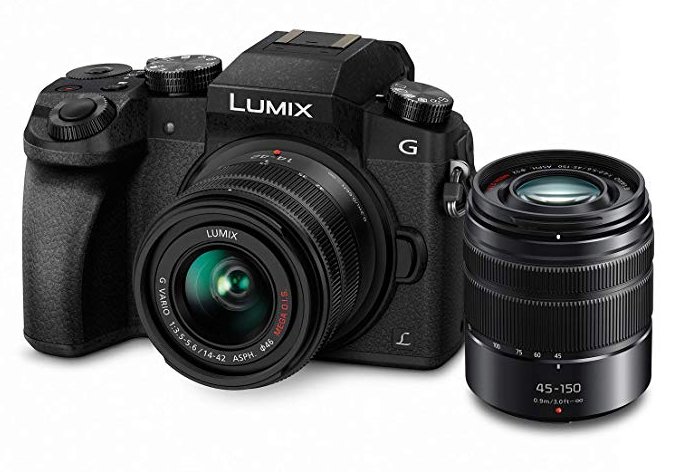
There’s something interesting about the Panasonic G85.
It’s not new, and it’s not trying to compete with the latest cameras anymore. It’s not chasing specs, and it’s not showing up in flashy marketing campaigns. And yet, it keeps coming up. You still see it recommended to beginners, you still see it used in YouTube videos, and if you already own one, there’s a good chance you’ve wondered whether you’re missing something.
In most cases, you’re not. The camera is still very capable.
The G85 is one of those cameras that quietly does its job. It doesn’t overwhelm you with complexity, but it also doesn’t limit you once you start learning. Over time, it starts to feel more capable than you initially gave it credit for, especially once you understand how it’s meant to be used.
This guide isn’t meant to walk through every button or every menu setting. Instead, it’s meant to help you actually use the camera in a way that makes sense.
Why the G85 Still Works
Over the years, I’ve used a range of cameras, including newer bodies with faster autofocus, better sensors, and more advanced features. Even with that in mind, the G85 still holds up in a way that’s easy to overlook.
Part of that comes down to balance. It gives you control where it matters, without overwhelming you with complexity. It’s one of those cameras that lets you learn at your own pace instead of forcing you into it.
What stands out most is how usable it is in real-world situations.
- Strong in-body image stabilization
- Reliable 4K video
- Fully articulating screen
- Solid physical controls
It ends up being the kind of camera you can grow into rather than outgrow immediately.
Don’t Overthink the Camera
When you first pick up the G85, it can feel like a lot is going on. There are buttons everywhere, multiple dials, and symbols that don’t mean much at first glance. It’s easy to assume you need to understand everything before you can take a good photo.
You don’t.
Most of the camera revolves around a small set of controls, and once those start to make sense, everything else becomes easier to navigate.
- Shutter button (focus + capture)
- Front dial (primary control)
- Rear dial (secondary control)
- Mode dial (how the camera behaves)
- Quick buttons (ISO, white balance, exposure)
Everything else can wait.
The One Adjustment That Changes Everything
If there’s one feature that immediately improves most beginners’ photos, it’s exposure compensation.
At a practical level, this is simply a way to tell the camera that you want the image brighter or darker than what it thinks is correct. Once you start using it regularly, the camera feels far less unpredictable.
How to use it:
- Press the +/- button
- Turn the dial
- Move right → brighter
- Move left → darker
Most early frustration comes from exposure, not the camera itself.
What the Camera Is Already Showing You
One of the most useful things about the G85 is also one of the easiest to overlook. The screen is showing you a live preview of what your final image will look like.
As you change your settings, the image gets brighter or darker in real time. Once you start trusting that preview, you stop guessing and start adjusting before you take the shot.
What this means in practice:
- You don’t need to “check after” every shot
- You can fix exposure before pressing the shutter
- You get faster feedback while learning
This is one of the biggest advantages of this type of camera.
The Modes That Actually Matter
The mode dial offers a range of options, but in practice, only a few of them are worth focusing on early.
Aperture Priority is the most useful place to start because it gives you control without overwhelming you. Manual mode becomes more useful once you want consistency, and Program mode works as a fallback when you don’t want to think too much.
What to use:
- A (Aperture Priority) → default learning mode
- M (Manual) → full control, stable lighting
- P (Program) → quick shooting
What to ignore (for now):
- Auto mode
- Scene modes
- Creative filters
These don’t really help you learn the camera.
A Practical Way to Think About Exposure
Exposure is simply brightness, and the camera controls it using three variables.
- Aperture → how much light enters
- Shutter speed → how long light enters
- ISO → how much the image is boosted
In Aperture Priority mode:
- You control aperture
- The camera adjusts shutter speed
If the image still looks off, you use exposure compensation to adjust it.
That’s the workflow.
A Small Rule That Makes a Big Difference
One of the easiest ways to avoid blurry photos is to pay attention to shutter speed.
When shooting handheld, slower shutter speeds introduce blur much faster than most people expect, especially indoors.
Simple guideline:
- Stay at 1/60 or faster for handheld shooting
If you drop below that:
- Raise ISO
- Open your aperture
This one habit prevents a lot of unusable photos.
Why the Camera Sometimes Gets It Wrong
There will be situations where the camera’s exposure doesn’t match what you expect. This usually comes down to how it’s measuring light.
The camera looks at the scene and tries to balance everything, but certain lighting situations can confuse it.
Common scenarios:
- Bright sky → subject looks too dark
- Dark background → subject gets overexposed
Instead of changing everything, it’s usually easier to adjust exposure compensation and move on.
Autofocus Without the Confusion
Autofocus is an area where it’s easy to overcomplicate things. The G85 gives you multiple options, but you don’t need most of them to get started.
A simple setup works best in most situations and keeps things predictable.
Start with:
- AFS (single autofocus)
- Single point focus area
When to change it:
- Face detection → portraits / people
- AFC (continuous) → movement / kids / sports
Everything else can wait until you actually need it.
When Manual Focus Makes Sense
Manual focus becomes useful in more controlled situations, especially when you want precision or consistency.
The G85 gives you tools that make this easier to use than most beginners expect.
Helpful features:
- Focus peaking (highlights what’s in focus)
- Magnification (zoom in to check focus)
Best used for:
- Macro
- Tripod shots
- Controlled video
Video Basics That Still Hold Up
The G85 remains a strong option for video, especially for beginners.
You don’t need complex settings to get good results. Starting simple is usually better.
Recommended starting point:
- Resolution: 4K
- Frame rate: 24p or 30p
Shutter rule:
- 24p → 1/50
- 30p → 1/60
This gives you natural-looking motion without overthinking it.
Why Autofocus Can Ruin Your Video
Autofocus behaves differently in video compared to photos, and it doesn’t always do what you expect.
It can shift unexpectedly or hunt for focus, especially in more complex scenes.
Common issues:
- Focus hunting
- Sudden shifts between subjects
- Inconsistent tracking
Better approach:
- Use face detection for interviews
- Use touch-to-focus when needed
- Use manual focus for controlled shots
Less automation usually leads to better results here.
Stabilization and Real-World Use
One of the reasons the G85 continues to be useful is its stabilization. It makes handheld shooting more forgiving and allows you to get usable results in situations where other cameras might struggle.
What it helps with:
- Handheld video
- Low-light stills
- General shooting stability
It doesn’t replace a tripod, but it reduces how often you need one.
Small Features That Are Easy to Miss
There are a few features on the G85 that are worth knowing about, even if you don’t use them often.
Examples:
- Burst mode → better for moving subjects
- 4K Photo → extract frames from video
- Post Focus → focus stacking
These work, but they’re not essential to everyday use.
Image Quality and ISO Tradeoffs
As you raise ISO, the image becomes brighter, but it also introduces noise. This tradeoff becomes more noticeable over time as you review your images more closely.
What to remember:
- Higher ISO → brighter but noisier
- Lower ISO → cleaner but darker
The goal is to balance both depending on the situation.
Understanding Lenses on Micro Four Thirds
One detail that often confuses people is how lenses behave on this system.
Key concept:
- 2x crop factor
Examples:
- 12–60mm → behaves like 24–120mm
- Depth of field is deeper than full frame
This isn’t a limitation, just something to understand.
The Habit That Matters More Than Settings
One of the most important habits has nothing to do with shooting.
After every shoot:
- Transfer your photos immediately
- Create at least one backup
Memory cards and drives fail more often than people expect. This is one of those habits that only becomes important after something goes wrong.
Where Most People Get Stuck
A lot of the common issues with the G85 come down to a few patterns.
- Using auto mode too much
- Ignoring shutter speed
- Overusing ISO
- Using the wrong focus mode
- Getting lost in menus
Most of these are easy to fix once you recognize them.
A Better Way to Approach the Camera
A simpler approach tends to work better.
Start with:
- Aperture Priority
- Exposure compensation
- Single point autofocus
- Awareness of shutter speed
This covers most real-world situations and gives you a strong foundation.
Final Thoughts
The G85 isn’t trying to impress you anymore, and that’s part of why it works so well.
It’s consistent, reliable, and predictable once you understand it. Instead of constantly thinking about the camera, you start focusing on what you’re actually trying to capture.
If you already own one, there’s a good chance you don’t need to upgrade yet. You may just need to spend more time learning how to use it well.